

Option A
Fiber Internet
The high-performance, symmetrical-speed option for demanding households.
Best for: Households with multiple simultaneous users, remote workers, and anyone who uploads large files or video conferences frequently.
Option B
Cable Internet
The widely available, capable choice for mainstream broadband needs.
Best for: Households in suburban and urban areas who need solid download speeds and value broad geographic availability.
How Each Technology Actually Works
Understanding the difference between fiber and cable starts with the physical medium each uses to carry your data.
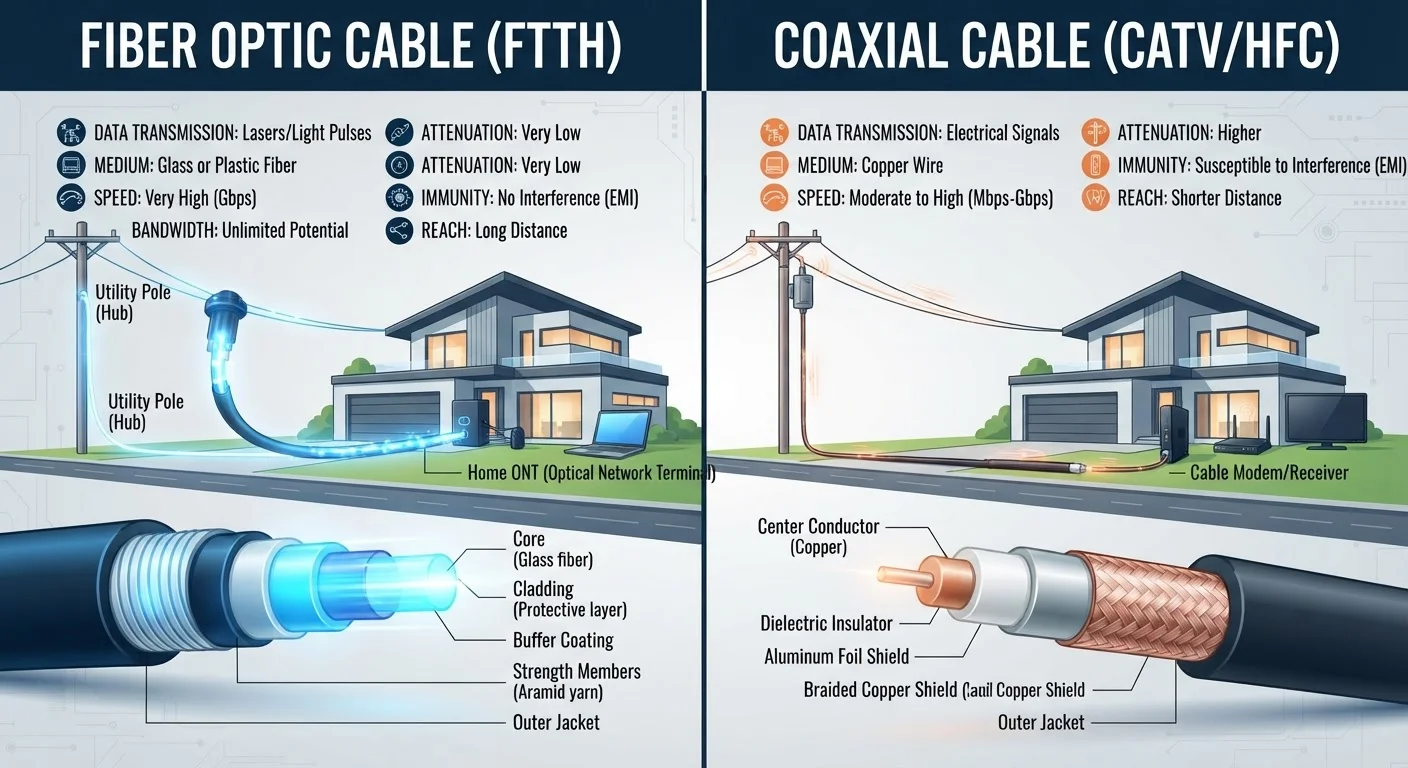
Fiber internet transmits information as pulses of light through thin strands of glass or plastic - a technology called fiber optic. Because light travels with minimal signal degradation over long distances, fiber connections maintain consistent performance from the provider's central office all the way to your home. Most modern fiber deployments bring the connection directly to the residence, sometimes called FTTH (fiber to the home).
Cable internet was built on the same coaxial copper infrastructure originally designed to carry cable television signals. Providers upgraded this network using a protocol called DOCSIS (Data Over Cable Service Interface Specification) to carry broadband data. The latest generation, DOCSIS 3.1, dramatically expanded cable's speed ceiling and is now widely deployed.
One architectural difference matters a great deal in practice: cable connections are typically shared among nearby households on the same network node, while fiber connections are generally dedicated. For a broader look at how these and other technologies fit together, see our overview of internet service types.
Speed and Performance: Where the Gap Appears
On paper, both technologies can now advertise gigabit download speeds. In practice, the differences show up in three specific dimensions: upload speed, peak-hour consistency, and latency.
Upload Speed
Fiber connections are almost always symmetrical - meaning upload and download speeds are equal. Cable plans are typically asymmetrical, with download speeds far outpacing upload. A plan advertising 500 Mbps download may deliver only 20-35 Mbps upload on cable. For households that primarily stream and browse, this rarely matters. For anyone uploading large video files, syncing cloud backups, or relying on video conferencing, the gap is meaningful.
Consistency Under Load
Because cable nodes are shared, performance can dip during evenings and weekends when many users in a neighborhood are online simultaneously. Fiber's dedicated lines are largely insulated from this neighborhood congestion effect.
Latency
Fiber typically produces lower latency (the delay before data starts moving), which matters most for real-time applications like online gaming or video calls. Cable latency is generally acceptable for most uses but tends to run slightly higher.
| Criterion | Fiber Internet | Cable Internet |
|---|---|---|
| Physical medium | Glass/plastic fiber optic strands | Coaxial copper cable |
| Typical download speeds | 100 Mbps - 2+ Gbps | 100 Mbps - 1 Gbps+ |
| Typical upload speeds | Equal to download (symmetrical) | Much slower than download |
| Peak-hour consistency | High - dedicated connection | Moderate - shared node |
| Latency | Generally lower | Generally slightly higher |
| U.S. household availability | Growing but limited footprint | Broad - majority of U.S. homes |
| Weather/interference sensitivity | Low | Low to moderate (older lines) |
Before taking advertised speeds at face value, it's worth understanding how providers define and measure them - our guide on common internet speed myths clarifies several widespread misconceptions.
Availability: The Most Practical Consideration
Performance comparisons only matter if both options are actually available to you. As of recent Federal Communications Commission (FCC) data, cable internet reaches the majority of U.S. households, while fiber infrastructure - though expanding rapidly - still covers a smaller geographic footprint, with coverage stronger in urban and some suburban markets.
Rural areas are often underserved by both technologies. If neither fiber nor cable reaches your location, alternatives like fixed wireless or satellite may be the realistic options. Our article on satellite internet in rural America covers what that technology can and cannot deliver.
Coverage Maps Are Not Always Accurate
National and state-level availability data for both fiber and cable can mask significant local variation. A street that appears covered on a provider's map may have installation limitations or waitlists for new fiber drops. Always confirm availability at your exact address directly with the provider before making any decisions. The FCC's broadband map is one public starting point, though it has known limitations in accuracy at the address level.
Before comparing plan details, check which providers actually serve your specific address - provider coverage maps can vary significantly from block to block, and national availability figures don't reflect your individual situation. Our walkthrough on evaluating an internet plan before committing can help once you know your options.
Infrastructure, Installation, and Reliability Over Time
Fiber optic cables are not susceptible to electromagnetic interference and tend to be more weather-resilient than aging copper infrastructure. Older coaxial cable networks can experience signal degradation due to worn connectors, corrosion, or outdated equipment - though providers continually upgrade their plant.
Installation timelines can vary. Fiber deployment sometimes requires new line installation to the home, which may take longer to schedule. Cable connections often reuse existing infrastructure already in place, potentially speeding up initial setup.
Both technologies are generally more reliable than DSL (which uses older telephone copper) or fixed wireless, and significantly more consistent than satellite, which introduces latency from the round-trip distance signals must travel. Once you have a connection type sorted, your in-home setup also affects real-world performance - see our comparison of wired vs. Wi-Fi connections to understand where the difference shows up inside your home.
The content on this site is provided for informational purposes only and should not be considered a substitute for professional advice. While we strive to provide accurate and up-to-date information, we make no guarantees regarding its completeness or accuracy. Always consult a qualified professional for advice specific to your circumstances before making any decisions.